**Before following these steps, make sure to stop your server first. This is to avoiding breaking anything on your server while you edit.**
**Step 1:** Head to your game panel and look for your **File** **icon** on the left hand side. // Photos to be added on AH 2.0 **Step 2:** When you are in you files, scroll down until you see a file named: **serverconfig.xml** // Photos to be added on AH 2.0 Step 3:** Open the file and look for the line that says: **<property name="ServerDescription" value="A 7 Days to Die server"/> .** When you have found this line, you can add your own custom Server Description in the Value area. If you want to add colour to your text, go to **Step3a:**Before: **<property name="ServerDescription" value="A 7 Days to Die server"/>** After: **<property name="ServerDescription" value="Alien Host New PVP Server!"/>**
**Step3a:** To add a colour to your text, head to this website and pick a HEX Colour. [Google Colour Picker](https://g.co/kgs/XfK2L9H) 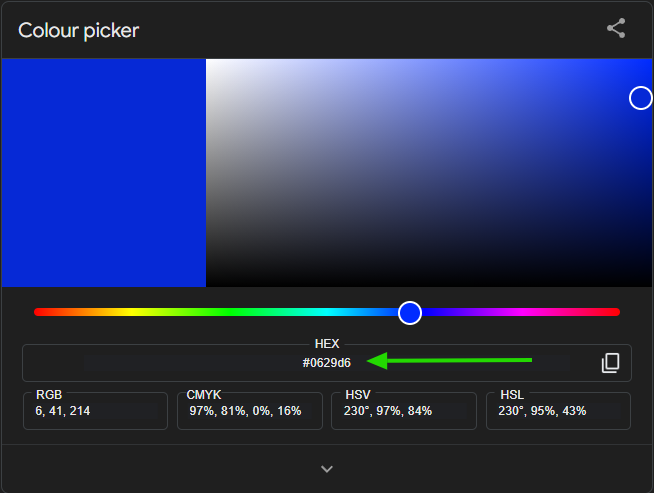 After you pick your colour go to the box and paste it where you want the colour to show. However, make sure you do \[\] for the colour to work.Before: **<property name="ServerDescription" value="Alien Host New PVP Server!"/>** After: **<property name="ServerDescription" value="\[0629d6\]Alien Host New PVP Server!"/> When you add you colour just make sure to remove the # Dont do this: \[#0629d6\] Do this: \[0629d6\] In the photo below u can see the Server Description has changed to blue.**
 //Photos to be added on AH 2.0**Make sure to save before exiting the file**.
**After Completing these steps, you can now go and start you server.**
//Photos to be added on AH 2.0