# How to link your Discord and Billing account

Linking up your Discord account to your Billing account grants you access to our Discord support service and allows our staff to quickly find the servers you have access to.  
  
**To link your discord. Navigate to our Billing Panel [here](https://alienhost.net/settings).**  
  
**1. You will be prompted with the following Page:**

[![image.png](https://help.alienhost.net/uploads/images/gallery/2025-06/scaled-1680-/Owmimage.png)](https://help.alienhost.net/uploads/images/gallery/2025-06/Owmimage.png)

[![image.png](https://help.alienhost.net/uploads/images/gallery/2025-06/scaled-1680-/4Emimage.png)](https://help.alienhost.net/uploads/images/gallery/2025-06/4Emimage.png)

[![image.png](https://help.alienhost.net/uploads/images/gallery/2025-06/scaled-1680-/TPVimage.png)](https://help.alienhost.net/uploads/images/gallery/2025-06/TPVimage.png)

<p class="callout warning">The code marked in red area will be different for you.</p>

 **Copy it.**

**2. Join our Discord [here](https://alienlabs.info/discord/).**

**3. Click on [<span style="text-decoration: underline;">bot-commands</span>](https://discord.com/channels/872919038081241188/987038610152902666) channel.**

 **4. In the text field insert the following command:** [![image.png](https://help.alienhost.net/uploads/images/gallery/2023-12/scaled-1680-/KXLimage.png)](https://help.alienhost.net/uploads/images/gallery/2023-12/KXLimage.png)  

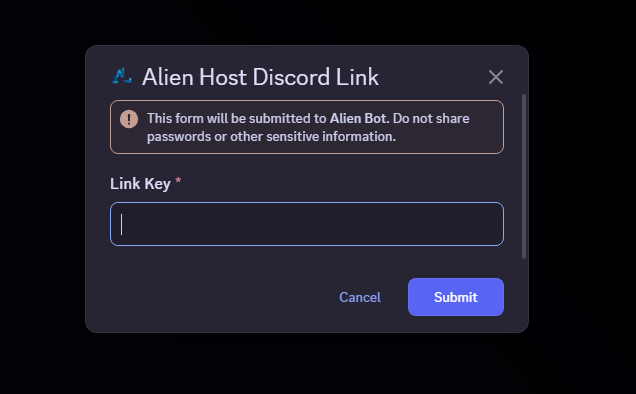
 **5. Insert the Key from <span style="text-decoration: underline;">Step 1:</span>**

[![image.png](https://help.alienhost.net/uploads/images/gallery/2025-06/scaled-1680-/wd9image.png)](https://help.alienhost.net/uploads/images/gallery/2025-06/wd9image.png)

**<span style="text-decoration: underline;">  
</span>**

**6. Confirm the form with the Key included.**

<p class="callout success">You are done!  
</p>

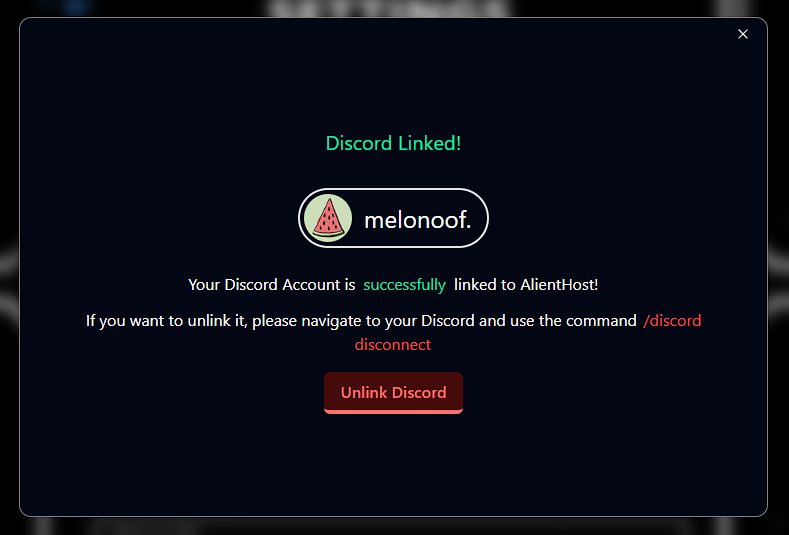
**Now you successfully linked your Discord account to your Billing account and as a result you should be seeing something similar to this.**

[![image.png](https://help.alienhost.net/uploads/images/gallery/2025-06/scaled-1680-/43Limage.png)](https://help.alienhost.net/uploads/images/gallery/2025-06/43Limage.png)