# Standalone (Bukkit/Spigot/Paper etc...)

<p class="callout info">Make sure you have opened a port first if didn't or don't know how to, [here a tutorial](https://help.alienhost.net/books/panel/page/overview-KW5)</p>

---

#### **1. Start**

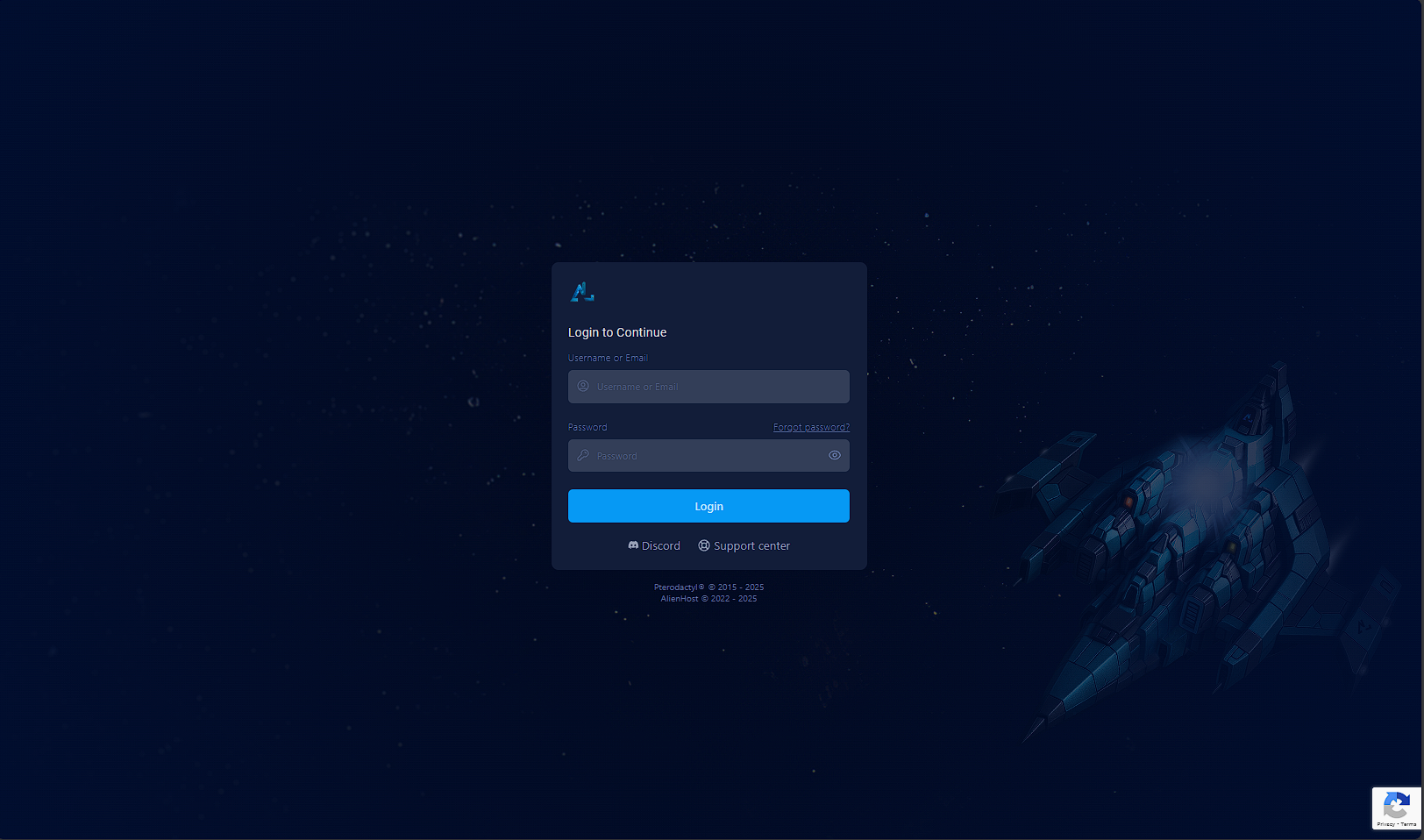
Get started by logging into the panel [here](https://panel.alienhost.net/)

[![image.png](https://help.alienhost.net/uploads/images/gallery/2025-06/scaled-1680-/zxkimage.png)](https://help.alienhost.net/uploads/images/gallery/2025-06/zxkimage.png)

---

#### **2. Panel**

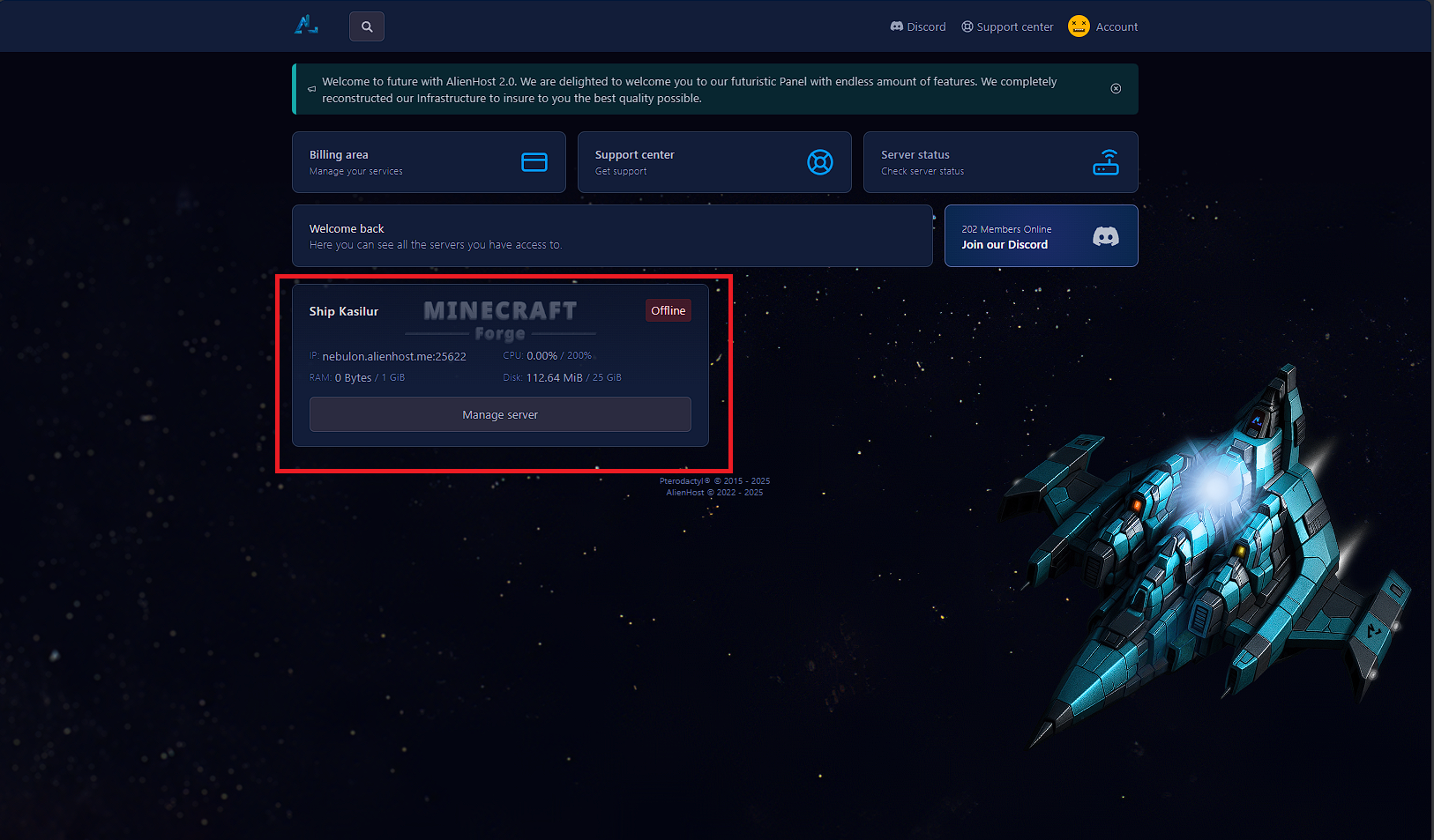
After you log into your account (or if you're already logged in), click on the server where you want to enable voting.

[![Screenshot 2025-06-02 104214.png](https://help.alienhost.net/uploads/images/gallery/2025-06/scaled-1680-/screenshot-2025-06-02-104214.png)](https://help.alienhost.net/uploads/images/gallery/2025-06/screenshot-2025-06-02-104214.png)
---

#### **3. Navigate to the directory**

Begin by starting your server if it's not already running.

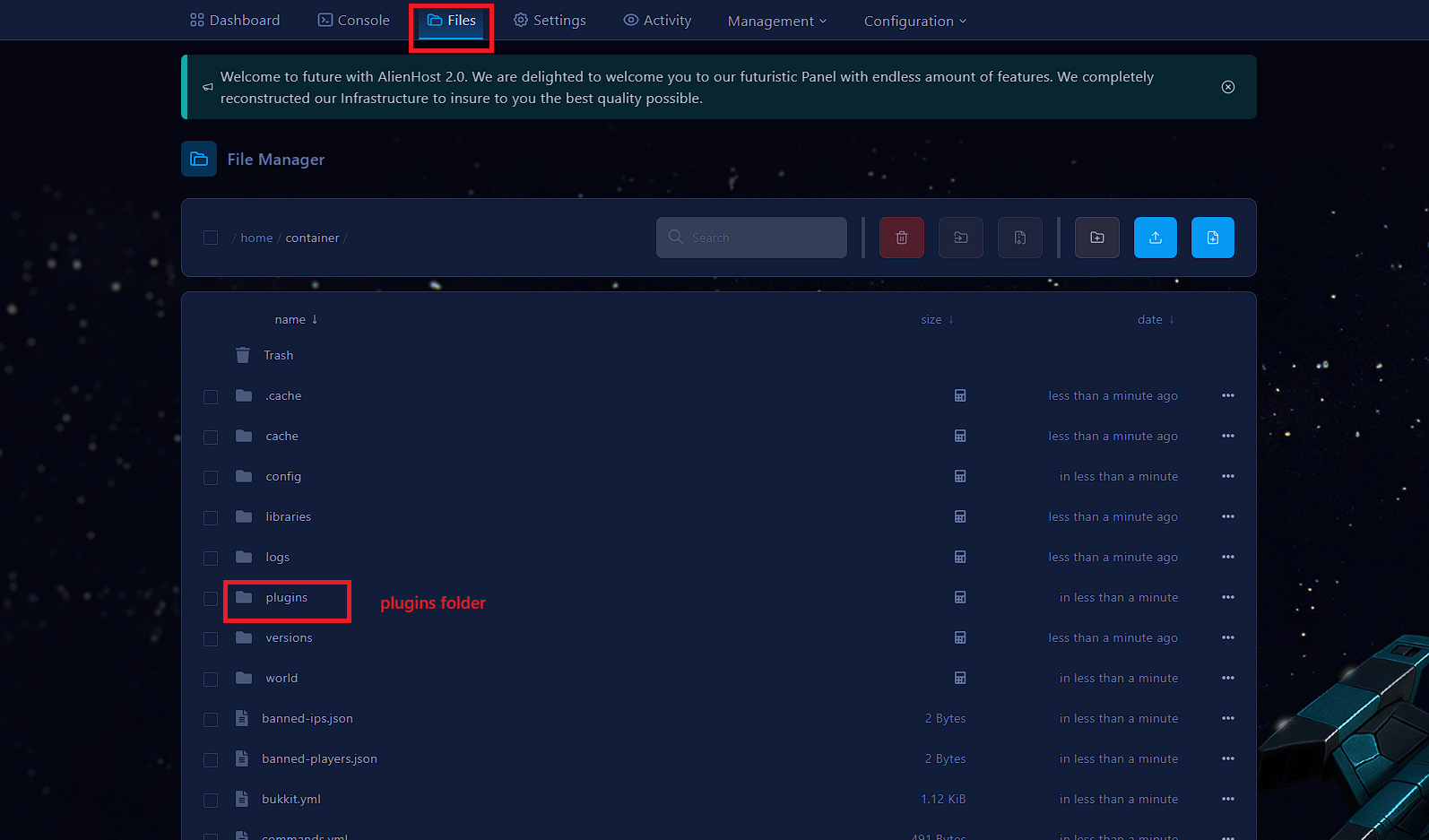
1. Next, go to the file manager.
2. Within the file manager, locate and navigate to the plugins folder

[![Screenshot 2025-06-02 104522.png](https://help.alienhost.net/uploads/images/gallery/2025-06/scaled-1680-/screenshot-2025-06-02-104522.png)](https://help.alienhost.net/uploads/images/gallery/2025-06/screenshot-2025-06-02-104522.png)

#### **<span style="vertical-align: inherit;"><span style="vertical-align: inherit;">3a. Upload the files</span></span>**

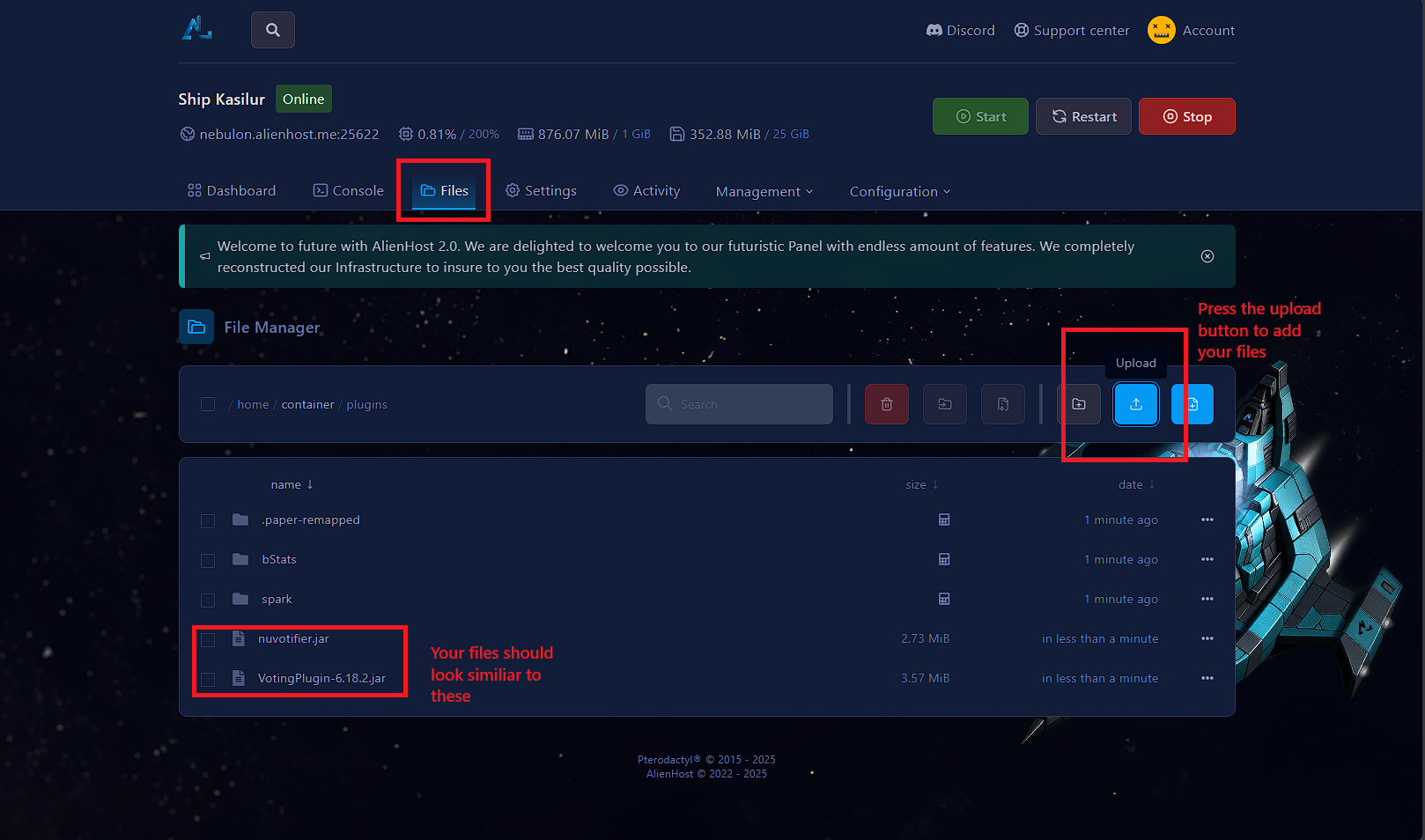
Inside the **plugins** folder, upload [NuVotifier](https://www.spigotmc.org/resources/nuvotifier.13449/) &amp; [VotingPlugin](https://www.spigotmc.org/resources/votingplugin.15358/)

1. To do this, click on the upload button (as shown in the picture below).
2. Once the upload is complete, the files will be visible in the file manager.

[![Screenshot 2025-06-02 104749.png](https://help.alienhost.net/uploads/images/gallery/2025-06/scaled-1680-/screenshot-2025-06-02-104749.png)](https://help.alienhost.net/uploads/images/gallery/2025-06/screenshot-2025-06-02-104749.png)
---

#### **4. Restart the server**

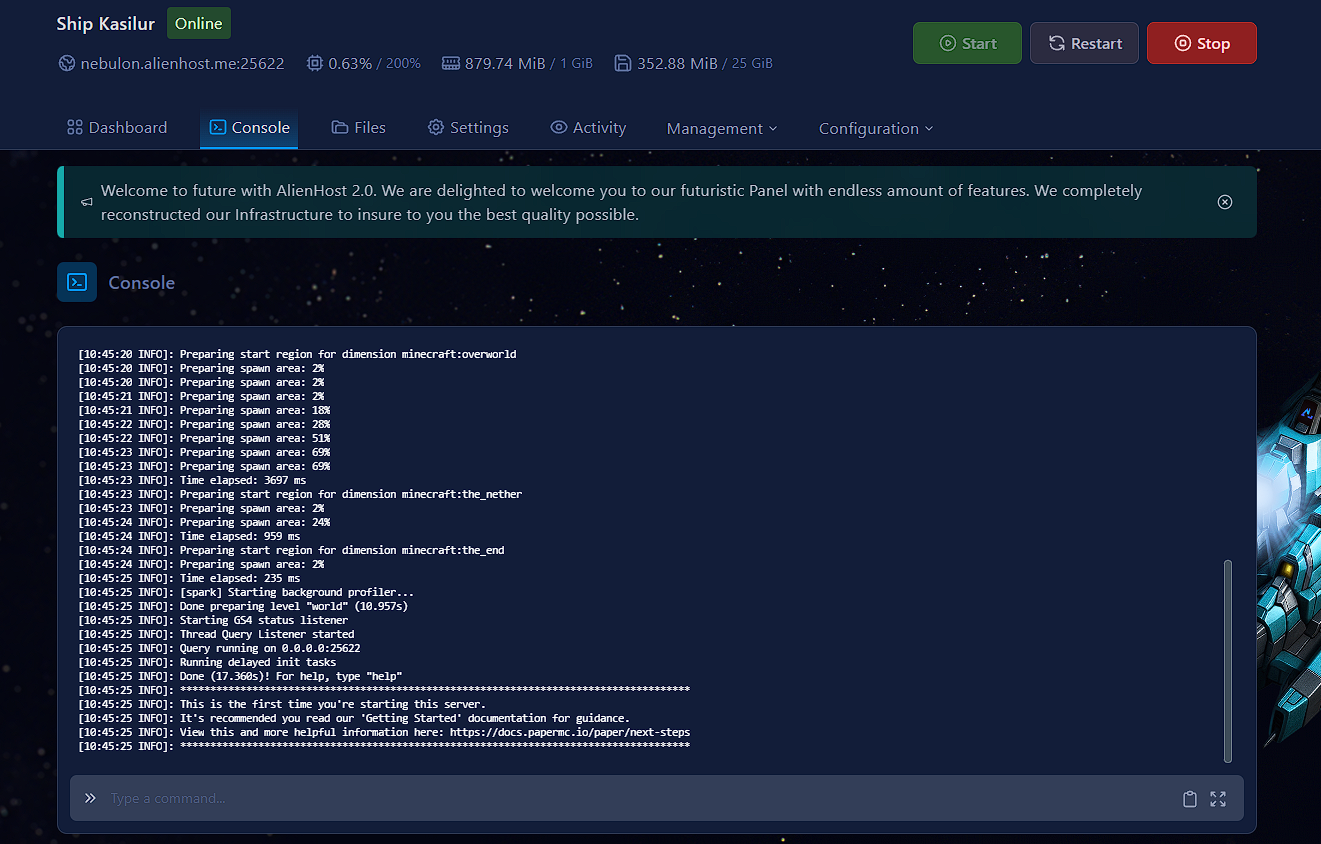
Return to the console and press the **Restart** button, to load the plugins.

[![image.png](https://help.alienhost.net/uploads/images/gallery/2025-06/scaled-1680-/FWeimage.png)](https://help.alienhost.net/uploads/images/gallery/2025-06/FWeimage.png)
---

#### **5. Configure**

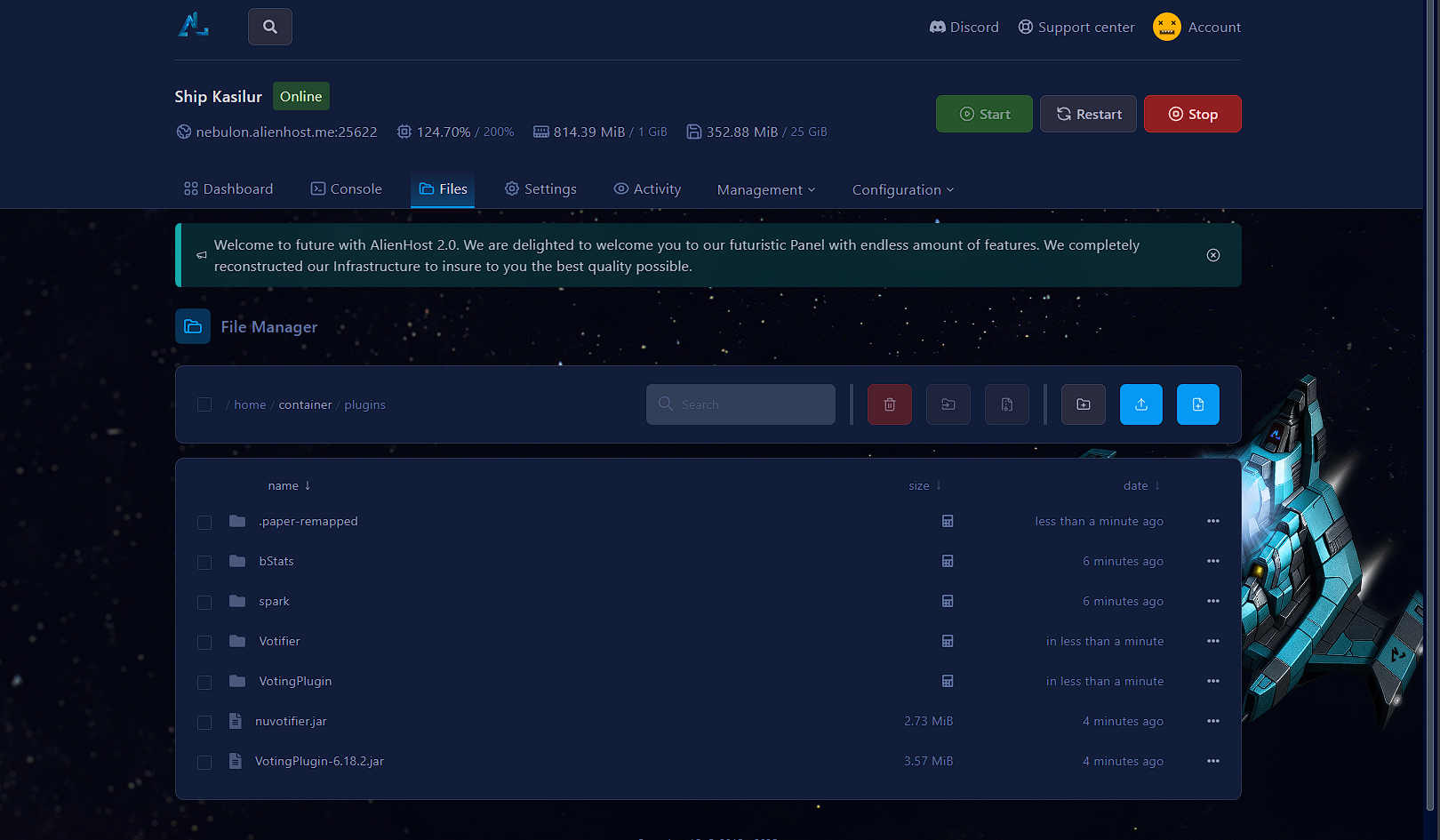
Now, return to the plugins folder as you did in steps 3 and 3a. You will see two new folders named "Votifier" and "VotingPlugin." Click on the folder labeled "Votifier."

[![image.png](https://help.alienhost.net/uploads/images/gallery/2025-06/scaled-1680-/GEXimage.png)](https://help.alienhost.net/uploads/images/gallery/2025-06/GEXimage.png)
---

#### **6. Config.yml**

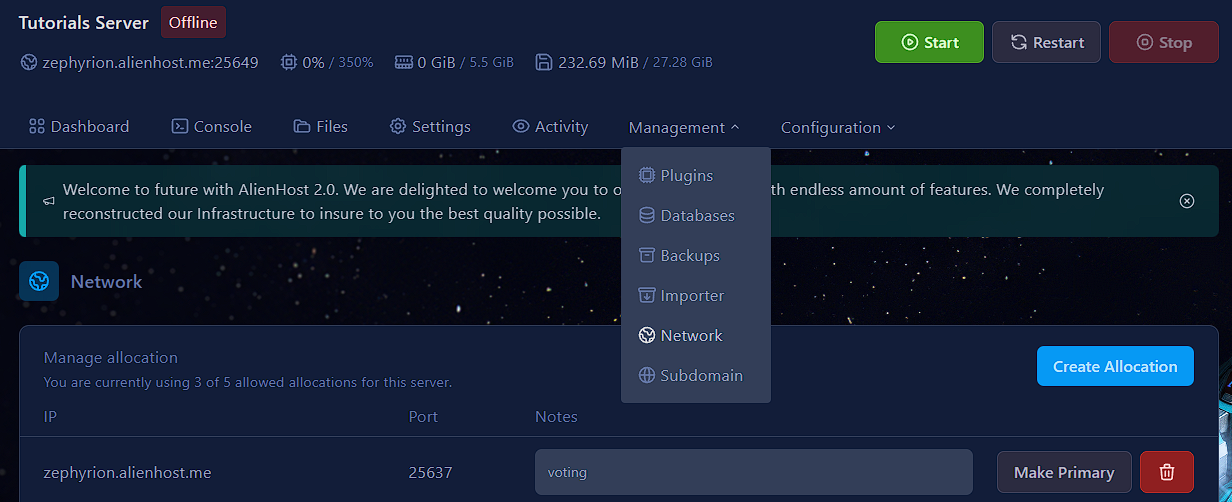
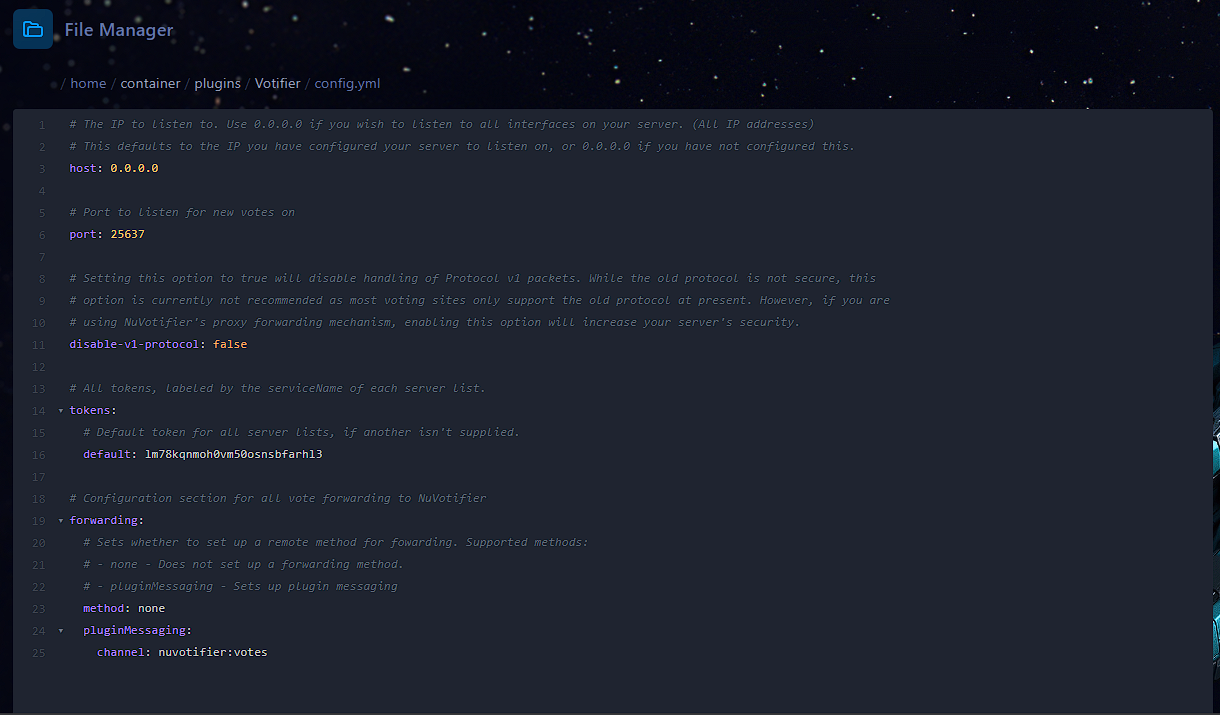
1. Inside Votifier's folder open the **config.yml** and change the port variable to the one allocated in the **network tab** (in my case, the port is 25637, in yours it may be a different one).
2. After copying the port, go back to the config.yml in **plugins/Votifier/config.yml** and paste the port in the port variable (by replacing 8192 with your actual port)

[![image.png](https://help.alienhost.net/uploads/images/gallery/2025-06/scaled-1680-/cdBimage.png)](https://help.alienhost.net/uploads/images/gallery/2025-06/cdBimage.png)
[![image.png](https://help.alienhost.net/uploads/images/gallery/2025-06/scaled-1680-/Iu6image.png)](https://help.alienhost.net/uploads/images/gallery/2025-06/Iu6image.png)
Setting up voting sites:

the IP can be found with [this tutorial](https://help.alienhost.net/books/network/page/getting-your-numeric-ipv4)

the port can be found in the Network tab

the token can be found in Votifier's config.yml

 the public key can be found in **plugins/Votifier/rsa/public.key**

---

### **7. VotingPlugin**

Once you've completed the setup for Votifier, proceed to configure VotingPlugin:

In the VotingPlugin folder, you'll see various files. For this tutorial, focus on "VoteSites.yml" and create valid rewards in the "Rewards" folder for your server.

##### VoteSites.yml:

inside we want to modify EverySiteReward variable (at the bottom of the file).

To add vote sites, we'll do it the easy way. I will create a vote site [here](https://minecraftservers.org/add-server)

[![Screenshot 2024-01-01 122323.png](https://help.alienhost.net/uploads/images/gallery/2024-01/scaled-1680-/screenshot-2024-01-01-122323.png)](https://help.alienhost.net/uploads/images/gallery/2024-01/screenshot-2024-01-01-122323.png)
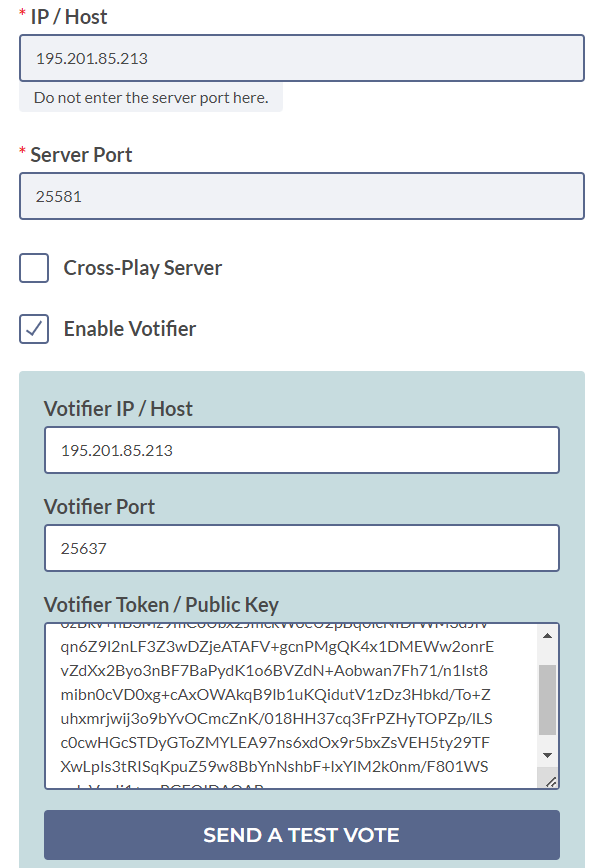
By following [this tutorial](https://help.alienhost.net/books/network/page/getting-your-numeric-ipv4) you can find your server's ip.

Now send a test vote to verify you've done everything correctly

In your server logs, it should look similar to this:

<details id="bkmrk-votifier-test-vote-l"><summary>Votifier Test Vote Logs</summary>

\[12:23:27 INFO\]: \[Votifier\] Got a protocol v2 vote record from /66.175.210.190:46534 -&gt; Vote (from:MinecraftServers.org username:MinecraftServers address:127.0.0.1 timeStamp:1704111807099 additionalData:null)  
\[12:23:27 INFO\]: \[VotingPlugin\] Received a vote from service site 'MinecraftServers.org' by player 'MinecraftServers'!  
\[12:23:27 WARN\]: \[VotingPlugin\] VoteSite with service site 'MinecraftServers.org' does not exist, attempting to generate...  
\[12:23:27 WARN\]: \[VotingPlugin\] VoteSite MinecraftServers\_org does not exist with the servicesite 'MinecraftServers.org', creating one, set AutoCreateVoteSites to false to prevent this  
\[12:23:27 WARN\]: \[VotingPlugin\] VoteSites.MinecraftServers\_org is not a configuration section  
\[12:23:27 INFO\]: \[VotingPlugin\] Current known service sites: MinecraftServers.org  
\[12:23:27 WARN\]: \[VotingPlugin\] Player MinecraftServers has not joined before, disregarding vote, set AllowUnjoined to true to prevent this  
\[12:23:31 INFO\]: \[VotingPlugin\] VotingPlugin is up to date! Version: 6.15

</details>You can find your ports in the Network tab

[![image.png](https://help.alienhost.net/uploads/images/gallery/2025-06/scaled-1680-/dfKimage.png)](https://help.alienhost.net/uploads/images/gallery/2025-06/dfKimage.png)

<p class="callout warning">Make sure your plugin is listening on the correct port, you can check in the console when restarting, look for this line: \[INFO\]: \[Votifier\] Votifier enabled on socket /\[0:0:0:0:0:0:0:0%0\]:25637. (My votifier port is 25637 as shown above, yours may be something else)</p>

After sending the test vote, the VoteSites.yml will set up automatically.

```yaml
  MinecraftServers_org:
    Enabled: true
    ServiceSite: MinecraftServers.org
    VoteURL: VoteURL
    VoteDelay: 24.0
    DisplayItem:
      Material: GRASS
      Amount: 1
    Rewards:
      Messages:
        Player: '&aThanks for voting on %ServiceSite%!'
# Mine's this, let's break it down:
# Enabled: is a boolean variable, so only true or false, when it's true, if you run /vote, you'll see it in the VoteGUI, if disabled, it's not going to be in the GUI.
# ServiceSite: usually the domain of the voting site, don't modify it
# VoteURL: The URL where your players will vote for your server example: https://minecraftservers.org/server/randomServerID
# VoteDelay: if 24.0, it's going to be 24h, there is VoteDelayMin too if you want the delay to be based on minutes example: VoteDelayMin: 60 which means the next time you can vote is going to be in 60 minutes
# DisplayItem.Material: the item to show in the gui for the vote site
# DisplayItem.Amount: how many Material(s) to show in the vote gui
#Rewards: just ignore that, if you don't know how to setup the plugin, I will show how to give rewards in the next step through EverySiteReward in the bottom of the file.
```

Set the "EverySiteReward" to the name of the rewards file you are about to create:

##### Rewards (folder):

in **plugins/VotingPlugin/Rewards**

<details id="bkmrk-examplebasic.yml-%23-t"><summary>ExampleBasic.yml</summary>

```yaml
# This is a reward file
# Define rewards in here (Items, commands, etc)
# File name is the reward name, without file extention
# This reward is named "ExampleBasic"
# That is what you put as a reward for other plugins, like VotingPlugin
# DO NOT HAVE DUPLICATE NAMES!!

# Wiki Page: 
# https://github.com/BenCodez/AdvancedCore/wiki/Reward-files

# This is basic reward file
# You can have multiple reward files that contain all kinds of rewards
# Below are some basic things you can have, see the advanced example for more

# You can just remove values you don't want (just delete it)
# If you just want money just have a reward file containg only "Money: 100", for example
# You can simply copy and paste from here what you want
# in other reward files, that is the way they are designed

# If true:
# Only allow one item with chance to go through (from items below)
# If no chance specificied it will only give the first item
OnlyOneItemChance: false

# Items to give to user
Items:
  # Item
  # This is not item display name
  # No duplicate names
  Diamond:
    # Item Material
    # https://hub.spigotmc.org/javadocs/spigot/org/bukkit/Material.html
    Material: 'DIAMOND'
    # Item data value (Eg 1:4, data is 4)
    Data: 0
    # Will only give Amount if min and max amounts are 0
    Amount: 1
    # Set item durability
    # Set to 0 or remove line for no durability
    #Durability: 100
    
    # Random amount of items between Min and Max will be given
    # if min and max are not both 0
    
    # Min amount of items
    #MinAmount: 1
    
    # Max amount of items
    #MaxAmount: 4
    
    # Chance for this specific item to be given
    #Chance: 30
    
    # Item name
    # Remove this value to have no name
    Name: '&aSpecial Diamond'
    
    # Lore
    # Remove this value to have no lore
    Lore: 
    - 'Line 1'
    
    # Enchants
    # use vanilla names
    Enchants:
      unbreaking: 1
    
    # Set glowing effect on item (enchanted item effect)
    Glow: false
      
    # Skull options
    #Skull: 'PLAYERNAME'
    # One place to find skull textures is here: https://minecraft-heads.com/
    #SkullTexture: 'SKULLTEXTURE'
    #SkullURL: 'URL to skull'
     
    # Hide enchants     
    #ItemFlags:
    #- HIDE_ENCHANTS
    
    # CustomModelData nbt tag
    #CustomModelData: 100
      
    # Set power of firework
    #Power: 1
    
    # Whether or not to break lore into more than 1 line
    # Disable for certain custom items if needed
    #CheckLoreLenth: true
    #LoreLength: -1
    
    # Color of potion bottle
    # 0-255
    #PotionColor:
      #Red: 0
      #Green: 0
      #Blue: 0
      
    #Potions:
      #SPEED:
        #Duration: 20
        #Amplifier: 1
      
# Amount of money to give, requires vault
# Use 0 to give none
# Money is not per world
# Use negative to take money
# May need to use a command if it doesn't work
Money: 1000

# Pick random number between min and max money amount
#Money:
#  Min: 100
#  Max: 3000

#######
# Experience rewards
#######
# Give player experience (not levels)
#EXP: 100

# Pick a random number between min and max EXP amount to give
#EXP:
#  Min: 100
#  Max: 1000

EXPLevels: 3

# Random amount of EXP levels between 3 to 7
# EXPLevels:
  # Min: 3
  # Max: 7

# Commands to run
# Use %player% for player name
# Remove for no commands
Commands:
- say hi
#Commands:
  # Commands here will be run by console
#  Console:
#  - 'say %player% was lucky'
  # Commands here are run by player
#  Player:
#  - 'vote total'

# The messages are sent when rewards above are given to user
# set to '' to give no message (or just remove the option)
Messages:
  Player: '&aMessage on reward'
  Broadcast: '&aThis is a broadcast'
  
# Can also do this to message player
#Message: '&aMessage to player'
```

</details>After setting up your rewards (you can check the above codeblock for some examples)

back in **VotesSites.yml** scroll to the very bottom and you'll find

```yaml
EverySiteReward: {}
```

remove the {} and set it to the name of your rewards file without the extension (.yml)

so:

```yaml
EverySiteReward: ExampleBasic
```

<p class="callout info">You may want to use [Vault](https://www.spigotmc.org/resources/vault.34315/) for permissions and economy features</p>